
Google Input Tools Nepali Download For Free In 2026

Are you looking for Google Input Tools Nepali Download For Free? Or, looking for Google Input Tools Nepali offline installer? If yes, then you are in the right place. Here is an ultimate guide on how to download & install Google Input Tools on your computer.
Typing your native language on your computer is not easy, especially if you are not from the US or the UK. So, Nepal has a different native language from English. Here in Nepal, we speak and write in Nepali for official or daily life. The Nepali language is our native language. Typing in Nepali on a computer is not easy.
Today, in this guide, you will learn how to install Google Input Tools and Nepali Google Input Tools. After installing Google Input Tools, you can type in Nepali.
Let’s start with our main topic.
What is Google Input Tools Nepali?
A Google input tool is a tool that enables you to type in Nepali on your computer. This tool can help you type in different languages. Google input tools create an interface to enable a typing option in your computer with a different language. I work in Nepali Unicode Romanized & Unicode traditional.
Google Input Tools Nepali for Windows is an input method editor that lets users type in Nepali using the English QWERTY keyboard. The keyboard layout of Google Input Tools Nepali differs from the Preeti font. Users can type a word using Latin characters, and Google Input Software will convert the terms to its native Nepali script.
Features of Google Input Tools Nepali
Here are a few key features of Google Input Tools:
- It is a free tool that can be used both online and offline
- You can easily integrate it with the Chrome browser to use online
- Easy to install
- It supports multiple languages
- It is easy to use and has a clean user interface
- 100% free tool
Google Input Tools Nepali For Chrome (Online Install)
How To Install Google Input Tools Nepali on Google Chrome.
- Go to the Google Chrome extension store
- Search “Google Input Tools”
- Click on add to chrome
- Add input language
- Select the language before typing
- Done


Google Input Tools Download Offline
Nowadays, Google does not provide offline installers; it only offers online input tools. Here we have saved our previous Google input tools, which were easy to use.
With the Google Input Tools Download Offline installer, you can easily install it on your device. It helps to type in MS Word, MS Excel, WordPad, or Notepad.
Google Input Tools For Windows (Offline Installer)
You can install Google Input Tools on your computer running Windows 32-bit or 64-bit. The installation process of Google Input is quite easy. To install, please follow the given instructions.
- Download Offline Installer (The Download Link is at the bottom of this article)
- Extract or unzip the download file
- Install GoogleInputTools.Exe
- Install GoogleInputToolsNepali.exe
- You can now see the language toggle option on the toolbar.
- Select the Nepali typing option
- Now, you are ready to write in Nepali using Google Input Tools
This installation process was the same for all Windows versions, including Windows 7, Windows 8, Windows 10, and Windows 11.
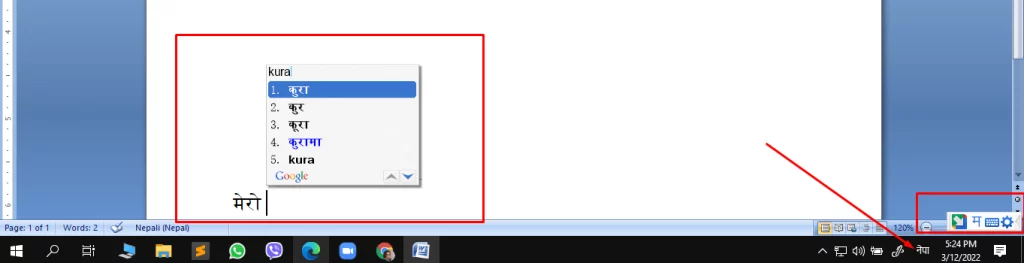
How to Enable Google Input Tool Nepali?
After successfully installing Google Input Tools Nepali Download, you are now ready to type in Nepali. But to do that, follow the given instructions. There is a new language on your computer, and you have to change the typing language option manually. Click the language option on the toolbar, then select the Nepali Google input tools.

How To Use Google Input Tools
You have to install the Google Input Tools Chrome extension.
Then add your desired language tools and start writing.
Another way to use Google Input Tools is in offline mode. You have to install the Google Input Installer, then install the Nepali input package.
After completing the setup, you can toggle the keyword typing mode. Where you can see the option for Google Input Tools Nepali.
Conclusion:
Now, I hope you learned how to download and install Google Input Tools. You can install Google Input Tools on your computer, online, and offline. If you want to type Nepali using Google Input Tools online, then install the Google Chrome extension.
Google input tools offline installer can help you install and use them in offline mode. If you don’t want to install Google Input Tools but still want to type in Nepali, then check the alternative Nepali Unicode romanized. You can use Nepali Unicode romanized, the same as Google Input Tools.
Here is the download link to Google Input Tools.
If you are looking for a collection of the best Nepali fonts, click here.
Check out:- Preeti Font Download

Plesase add me
please let me know when I can be there.
The .rar archive for the Google Input Tool is broken. Could you please share a working one?
It’s working
hi
Has the installer been installed on Windows 11 before?
No, you have to install input tool separately.
does it work in MAC ?
how do i download preeti font ? coz, i don’t have preeti
check this page to download preeti font. https://ankjit.com.np/preeti-font-download/
is it available for MacBook